
How to Find Similar Songs for Sync: Soundalike Search for Music Supervisors and Catalogs
How music supervisors, editors and catalogs use audio similarity search and natural-language prompts to find cleared songs that match a reference.
The SourceAudio Team
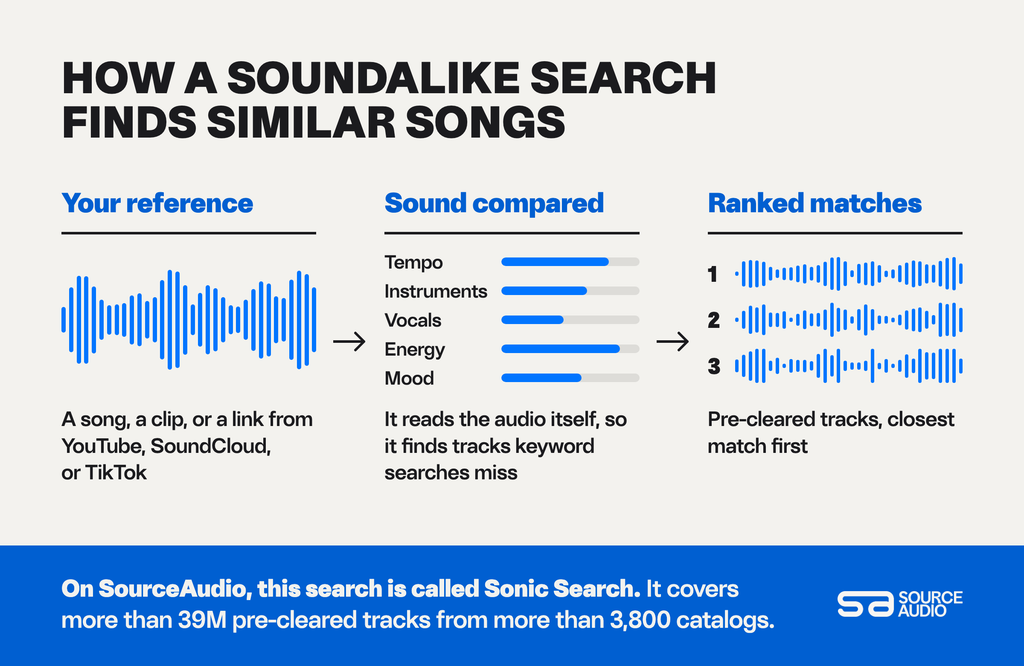
To find similar songs you can license, start with a reference track and run an audio similarity search. The search compares the sound of your reference (its tempo, instruments, vocals, energy, and mood) against a catalog of pre-cleared music and puts the closest matches at the top.
On SourceAudio, that search is called Sonic Search. You can start it from an audio file or a YouTube, SoundCloud, or TikTok link, and search across more than 39M pre-cleared tracks from more than 3,800 catalogs. Below, we cover how soundalike search works, when to search with a prompt instead, and how to stay on the right side of the line between “sounds like” and “copies”.
What is a soundalike search?
A soundalike search finds tracks that share the sonic qualities of a reference. You give it a song, a clip, or a link, and it returns tracks with a similar feel: comparable tempo, instrumentation, vocal style, texture, and mood.
It works on the audio itself, so it can surface tracks that keyword searches miss. Two tracks can sound alike even when one is tagged “uplifting indie” and the other “bright acoustic pop”.
Why do music supervisors search by sound?
Most briefs start with a reference. A director falls in love with a temp track during the edit, an agency mood board names a song the client already likes, or a trailer needs “something like” a hit that’s far outside the budget.
Describing that sound in keywords is slow and unreliable. Searching with the reference itself is the fastest way to find similar songs that are already cleared, so you can spend your time choosing between good fits.
How do you find similar songs with audio search?
- Pick a reference. Use the track the director, client, or brief points to. On SourceAudio, Sonic Search accepts MP3, WAV, and AIFF files, plus YouTube, SoundCloud, and TikTok links.
- Choose the part that matters. If only the chorus or the opening 20 seconds captures the feel, narrow the reference to that section so the search matches it.
- Run the search. The most sonically similar tracks appear at the top of the results.
- Narrow it down. Combine the results with metadata filters, such as tempo, vocals or instrumental, mood, genre, and duration, or with extra keywords.
- Search from a track you already like. Found a strong candidate? Run Similar Tracks from that track to see more music like it, with no download or upload needed.
- Audition against picture. Play your shortlist under the scene or spot. A track that matches the reference on paper can still feel wrong in context.
How do you search a music catalog with prompts?
A prompt search lets you describe what you want in plain language. On SourceAudio, you start with “I want” and finish the sentence the way you’d brief a colleague:
- I want a warm acoustic track for a farewell montage
- I want a tense, pulsing synth cue for a late-night car chase
- I want a song in the style of 1970s soul with strings and a female vocal
- I want upbeat instrumental music for a school fundraiser video
Prompts work best when you can describe the scene, the feeling, or the era, and you don’t have a reference to hand. You can mention genres, instruments, moods, scenarios, and well-known reference points.
When should you use audio search, and when should you use a prompt?
| Use audio search when | Use a prompt when |
| You have a reference track or link | You have a scene or a feeling, but no reference |
| The brief says “something like this” | The brief describes a mood, setting, or era |
| You need to match tempo and texture closely | You want a wider range of options to start from |
| You’re replacing a temp track | You’re exploring for a new project |
Many searches use both. Start with a prompt to find the right territory, then run Sonic Search from your favorite result to find similar songs.
How close is too close?
A safe soundalike shares the feel of a reference (its energy, tempo, instrumentation, and mood) while its melody, lyrics, and hooks are its own.
Audio similarity search compares how tracks sound overall, which makes it a good way to find music in the same spirit. Before you license a track for a high-profile placement, listen for any melody or hook that’s too close to the reference, and check with your clearance team or legal counsel if you’re unsure. Every track you find on SourceAudio is pre-cleared by its rightsholder, so once you’ve chosen a track, licensing it is straightforward.
How can catalogs make their songs easier to find in searches for similar music?
Sonic Search listens to the audio, so every track in your catalog can show up in results. Good metadata decides what happens next, because supervisors filter and sort the matches they get. To give your music the best chance:
Watch the Brief Inbox. When buyers send requests to the SourceAudio network, they land in your Brief Inbox, so you can pitch tracks that match.
Tag thoroughly. Genre, mood, tempo, vocals, and instrumentation help supervisors filter results down to your track. SourceAudio’s AI-powered metadata can fill in descriptive tags for your whole catalog.
Upload your alternate versions. Instrumentals, stems, and cutdowns give supervisors the version that fits the edit, and each one can match a different search.
Keep your catalog current. New releases show up in search results as soon as they’re live on your SourceAudio site.
How do you find similar songs on SourceAudio?
Sonic Search is built into SourceAudio. Rightsholders host and manage their music in Catalog Manager, and that music is searchable by sound and by prompt. Music supervisors, editors, and media teams can search pre-cleared music from more than 3,800 catalogs in one place with SourceAudio for music supervisors.
See all of our AI search and discovery tools, or talk to our team about setting up search for your company.